Sales Pipeline
Every lead and every estimate, on one board
Requests come in from your website, the phone and the customer portal. Estimates go out all week. Then they scatter across inboxes, sticky notes and somebody's memory, and the ones nobody chases go cold. Servgrow's Sales Pipeline puts every request and estimate on one board, from the moment someone asks for a price to the moment they say yes. You see who needs a call, which estimates are still waiting, and exactly how much money is sitting on the table.
How a Sales Pipeline Grows Your Business
Most service businesses don't have a lead problem. They have a follow-up problem. The request that came in on a busy Tuesday never got a call back. The estimate you sent three weeks ago is still sitting there, and the customer quietly booked someone else because nobody checked in. Each of those is a job you already paid to win, through your ads, your website and your reputation, and then let walk out the door. A sales pipeline stops the leak. When every open opportunity sits on one screen, the cold ones stand out, everyone on the team knows what happens next, and more of the work you quote ends up on the schedule.
One Board
Every Request and Estimate, Card by Card
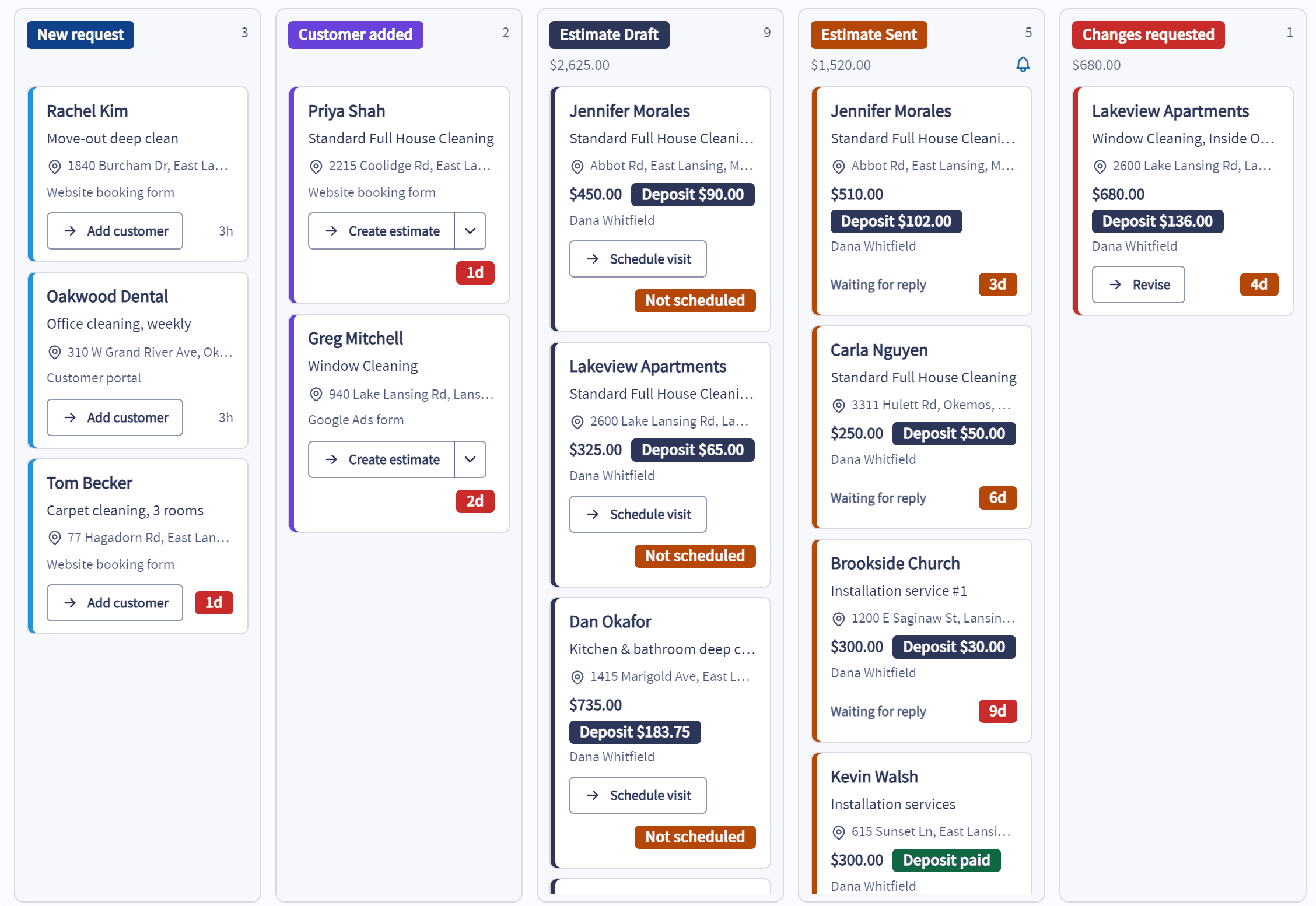
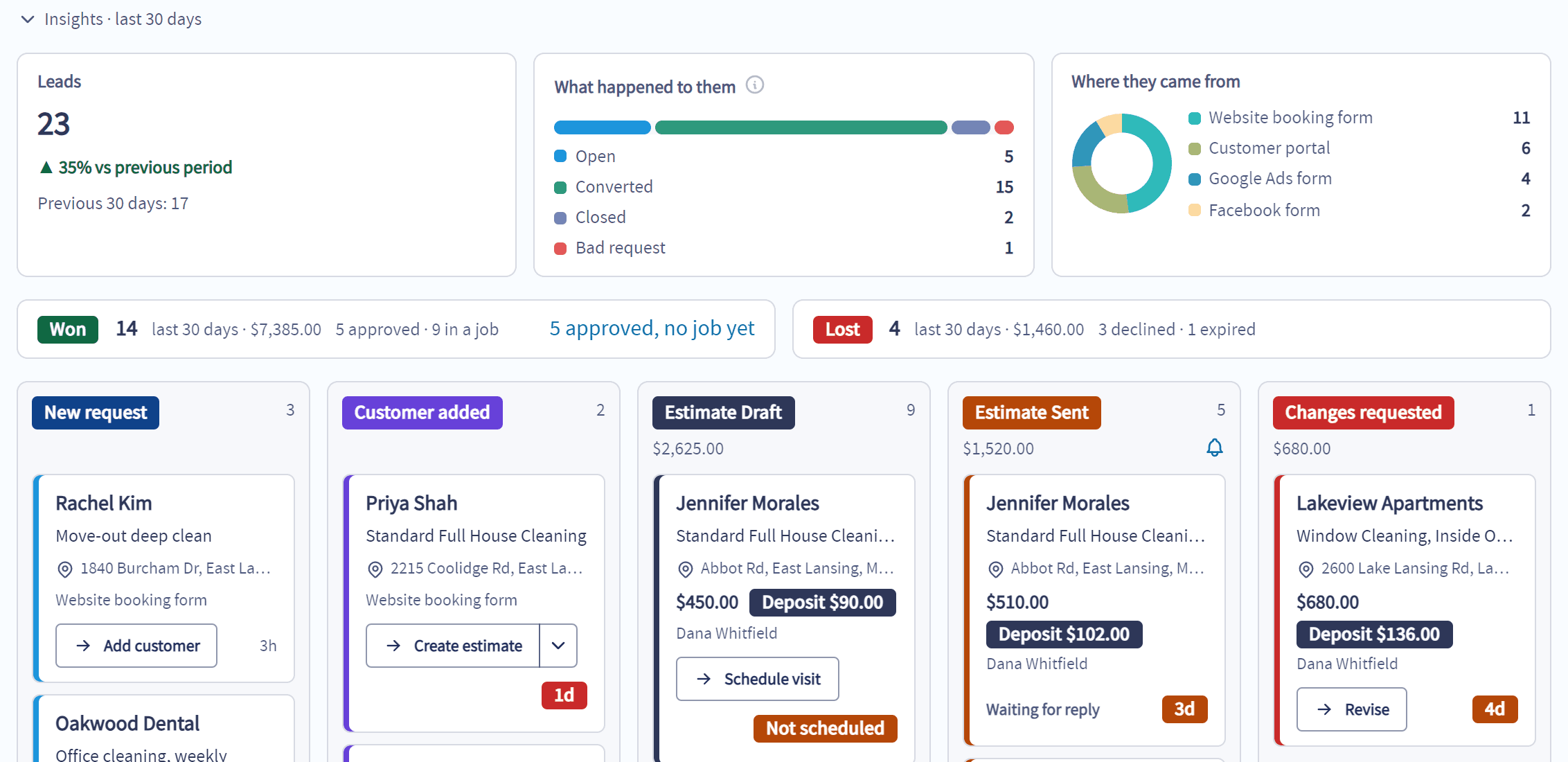
Each opportunity sits in the column that says exactly where it stands.
Requests and estimates together: Online bookings, portal requests and the estimates your team writes all land on the same board, so nothing hides in a list you forgot to check.
The whole story on the card: Customer, service, address, price, deposit and who owns it, without opening a thing.
Old estimates jump out: Every sent estimate shows how many days it has been waiting on the customer.
Next step in one click: Schedule the estimate visit straight from the card.
Insights
See What You Won, What You Lost and Where Leads Come From
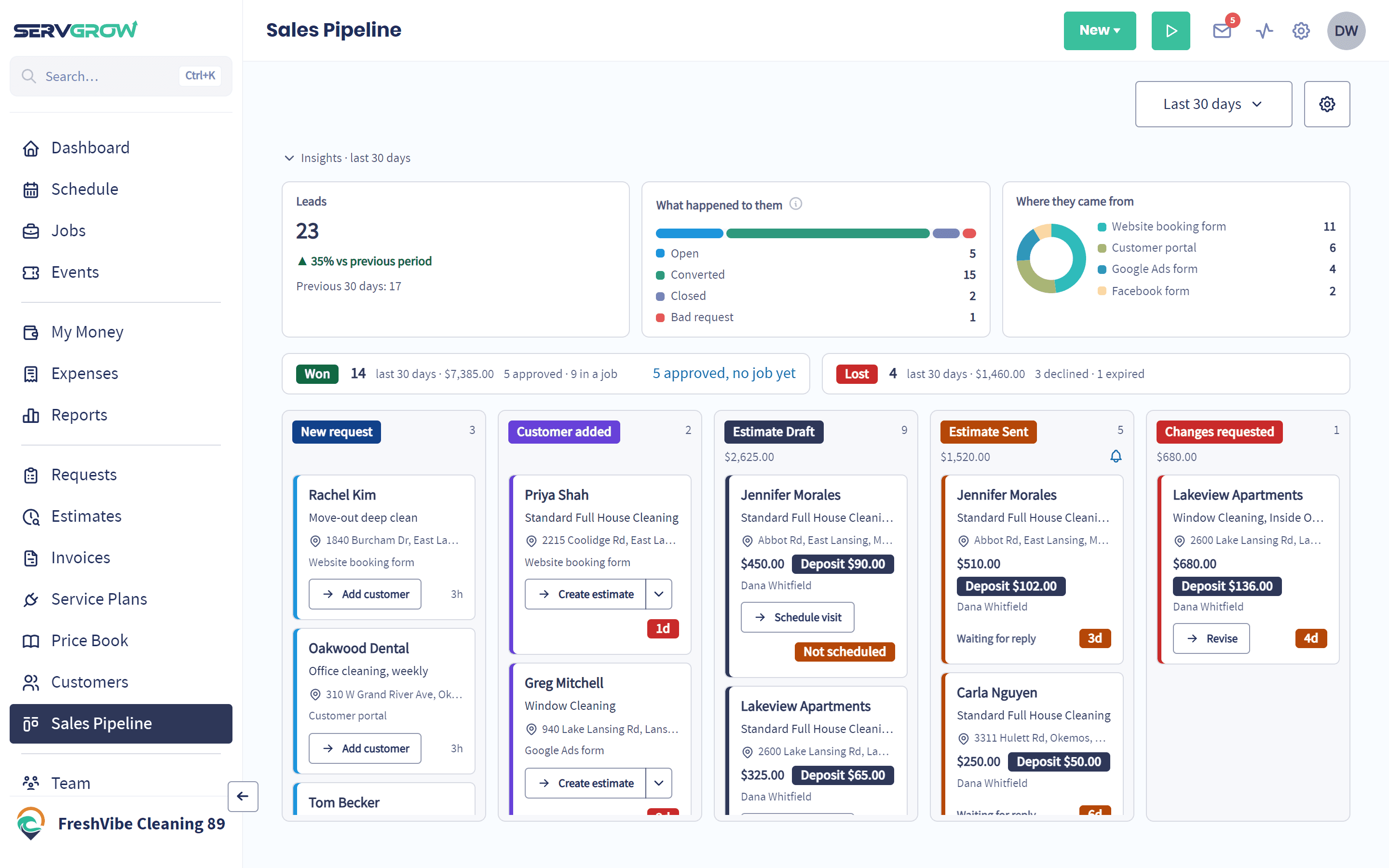
The top of the board tells you how sales are really going, for whatever dates you pick.
Won and lost, in dollars: How many estimates you won and lost, and what they were worth.
Yeses that still need a job: Approved estimates with no job yet are counted and one click away, so a customer who said yes never waits on the office.
What happened to every lead: Open, converted, closed or a bad request, so you know how many leads really turn into work.
Where they came from: Which booking form or the customer portal each lead came through, so you know which links and pages bring in work.
Your Process
Set the Board Up the Way You Sell
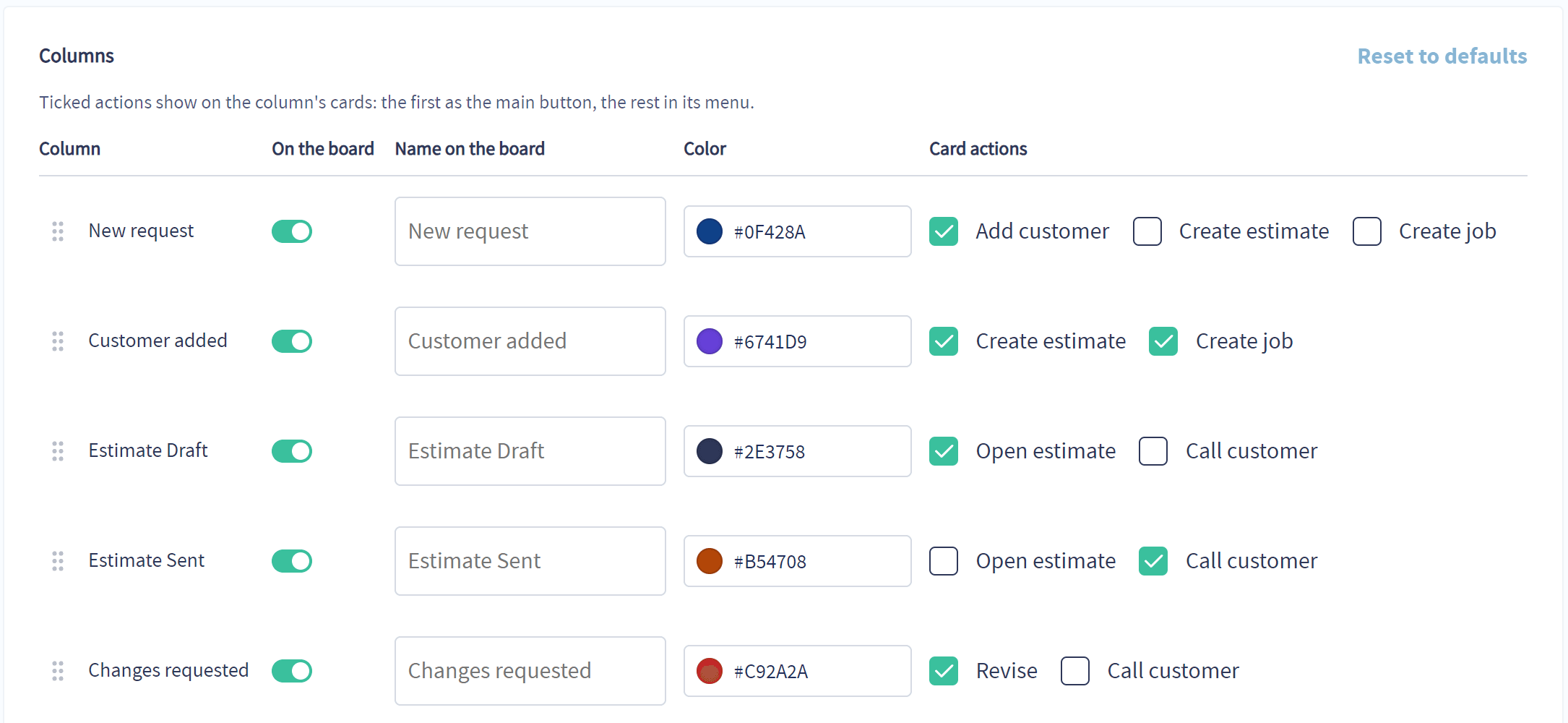
No two businesses sell the same way, so the board is yours to set up.
Your words and colors: Rename any column to what your team actually calls that stage, and give it a color that reads from across the office.
Your order: Drag the columns into the order your sales really happen, and hide the ones you don't use.
Your next steps: Choose the buttons each card shows, such as Add customer, Create estimate or Call customer.
Your deadlines: Set how long a card can sit in a column before it turns orange, then red, so a stale lead can't hide.
Follow-Up
Estimates That Don't Get Forgotten
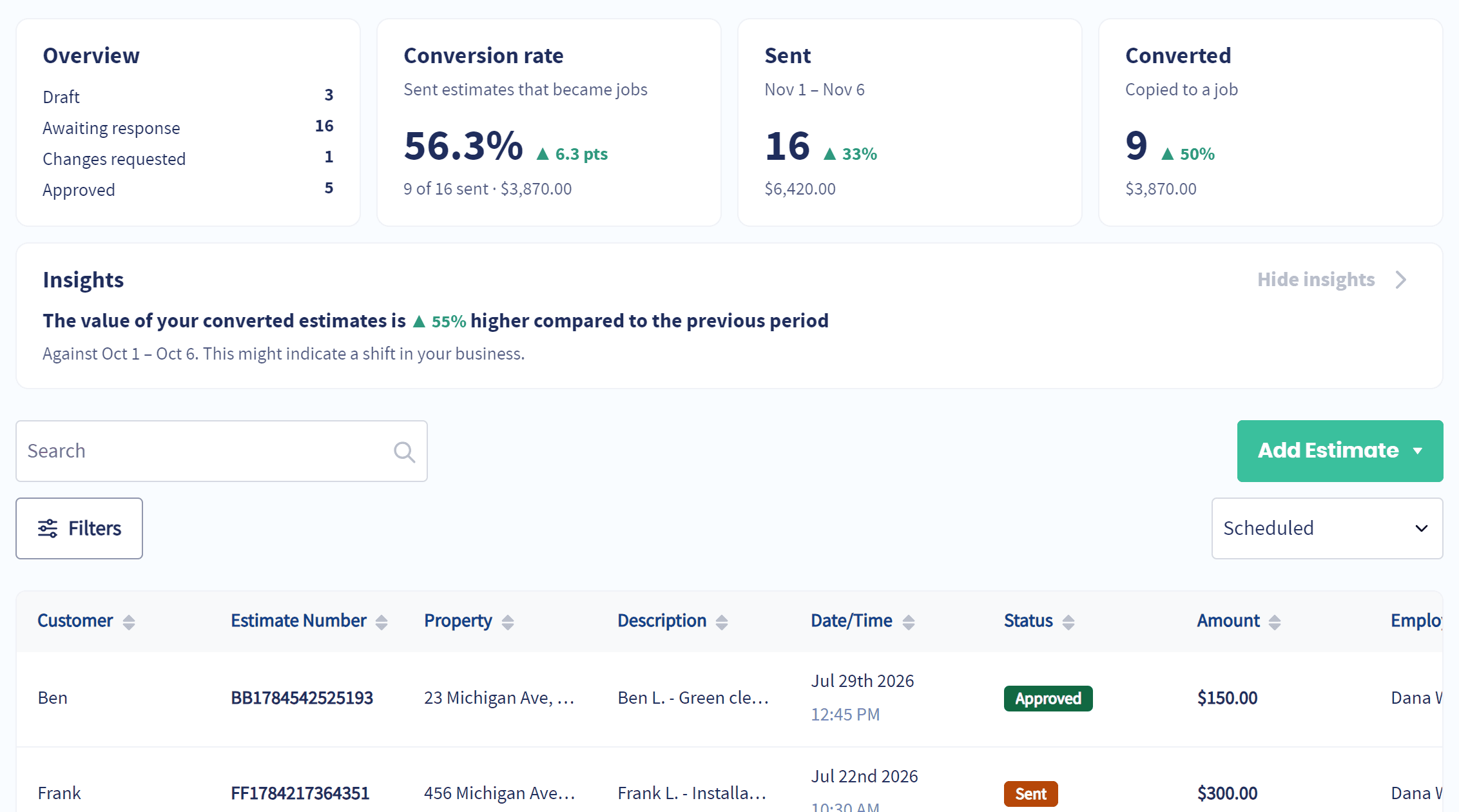
The board shows you what's waiting. Servgrow helps you close it.
Your win rate at a glance: Estimate stats on your Home and Estimates pages show what you sent, what got approved and what is still waiting.
A deadline that creates urgency: Set estimates to expire after a number of days, so customers know the price won't wait forever.
A reminder before it runs out: Servgrow reminds the customer before their estimate expires, while there is still time to say yes.
Follow-ups on autopilot: An automated follow-up nudges the estimates you haven't heard back on, so nobody has to remember to call.
What is a Sales Pipeline?
A sales pipeline is a visual way to track every potential job from first contact to signed estimate. Each lead or estimate is a card, and each column is a stage in your sales process, such as new request, estimate sent or changes requested. For a home or commercial service business it answers the questions that decide your revenue: who asked for a price and hasn't heard back, which estimates are waiting on the customer, how many you are winning, and where your best leads come from. Servgrow builds the pipeline from the requests and estimates you already have, so there is nothing extra to keep up to date.
Wrap Up: Stop Losing Jobs You Already Paid to Win
Every lead costs you money to get. The Sales Pipeline makes sure you get your money's worth: every request answered, every estimate followed up, and every yes turned into a job on the schedule. Open the board in the morning, call the cards that need you, and watch the Won column grow.